Datasheet | Check Point SASE Internet Access: Double Your Protection
Check Point SASE Internet Access protects users from web threats with cloud-based and on-device security. Provides secure internet access, SSL inspection, web filtering, split-tunnel protection, and consistent cyber security enforcement for remote, hybrid, and office-based users.
© 2026 Check Point Software Technologies Ltd. All rights reserved.
Check Point SASE Internet Access: Double Your Protection
Check Point SASE Internet Access ensures employees are always protected from web threats without sacrificing network performance or leaving employees vulnerable to web-based attacks.
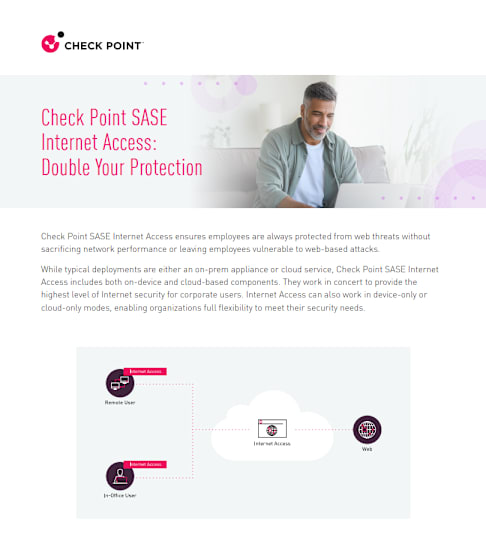
While typical deployments are either an on-prem appliance or cloud service, Check Point SASE Internet Access includes both on-device and cloud-based components. They work in concert to provide the highest level of Internet security for corporate users. Internet Access can also work in device-only or cloud-only modes, enabling organizations full flexibility to meet their security needs.
© 2026 Check Point Software Technologies Ltd. All rights reserved.
2 DATA SHEET
CHECK POINT SASE INTERNET ACCESS: DOUBLE YOUR PROTECTION
Always Protected, No Compromises Direct Cloud Access
No matter where employees connect from, be it the office, home, or anywhere in between, they are always protected. With Internet Access, there’s no need to backhaul traffic through an on-prem location.
Security, Everywhere
Since Internet Access can be in two places at once, employees are protected even when they are not connected to the corporate network. IT Managers can rest assured that corporate devices are being defended whether they are connecting to the company network, or not.
Protect Bypassed Traffic
Web bypass rules (split tunneling) are the go-to solution for reducing latency and increasing application performance. This can leave employees unprotected and vulnerable to attacks.
Device-side Internet Access means your people are protected even when performance needs supersede security requirements.
Secure SSL Inspection
SSL inspection happens on the device. No worries about decrypting private company data in an uncontrolled environment. With Internet Access, SSL inspection is always local.
Granular Web Filtering
Harmony SASE’s user-centric granular control extends to Web Filtering. Website access rules can be customized for different individuals or groups, and according to time of day. This allows organizations to regulate access to AI-related sites – allowing only approved teams to use generative AI tools while restricting others. Similarly, social media sites can be blocked during work hours except for teams that require them.
© 2026 Check Point Software Technologies Ltd. All rights reserved.
3 DATA SHEET
CHECK POINT SASE INTERNET ACCESS: DOUBLE YOUR PROTECTION
Apply All Internet Access’s cloud-side component adds an additional layer of protection for traffic passing through the corporate network. It enables admins to enforce consistent, network-wide policies that should apply to all users.
Get Strict at Work
Apply stricter policies for when users are “at work” (i.e., connected to the corporate network). For example, blocking access to social networks (e.g., Facebook) to improve productivity, or blocking access to gambling or hate websites to reduce the risk of employee misconduct and possible liability for the organization.
Differentiate by Network
Internet Access is part of a converged network security platform that supports creating multiple, self- contained networks for a single company. For example, you could have one for the sales team, and another for other employees. These different networks can have separate filtering rules that suit the unique needs of each user base.
Advanced Threat Prevention Engines
Check Point SASE provides a number of threat prevention engines that you can activate for specific groups, individuals, or all users based on the needs of your organization’s risk profiles.
Malware protection checks legitimate web traffic for illegitimate software. Whether an attack comes from third-party ads, trojans, or zero-day exploits, the malware protection capability has you covered.
Threat emulation assesses suspicious files by analyzing them and running them in a secure cloud sandbox. It can detect zero-day threats and advanced attacks that may bypass traditional defenses. If a file turns out to be malicious, further downloads of the file are forbidden and it’s blocked on the originating user device.
Access rules can be tailored for specific users or groups, and adjusted by time of day. Organizations can also regulate access to AI‑related websites—allowing only approved teams to use generative‑AI tools while restricting others. Similarly, social media sites can be blocked during work hours except for teams that require them.
The anti-bot feature blocks command-and-control URLs preventing bots from receiving instructions and carrying out further malicious behavior. It does this by assessing website reputation and preventing infected devices from reaching harmful servers.
© 2024 Check Point Software Technologies Ltd. All rights reserved.© 2026 Check Point Software Technologies Ltd. All rights reserved.
4 DATA SHEET
CHECK POINT SASE INTERNET ACCESS: DOUBLE YOUR PROTECTION
Book a Demo
SaaS Security
Controlling and protecting access to Software-as-a-Service (SaaS) platforms is just as critical as securing access to company data centers or cloud environments. Internet Access provides several key protection mechanisms for SaaS:
• Static IP allowlisting allows only users logged in to the corporate network access to your SaaS applications
• Application Control gives administrators the ability to block/allow specific SaaS apps
• Tenant Restriction prevents users from logging in to popular business platforms like Office 365 and Google Workspace with their non-work identities.
Check Point SASE Internet Access Advantages
• Single-pane-of-glass management console for all functions
• SaaS Security for controlling access to sensitive platforms
• Threat emulation for analyzing malicious files
• Anti-bot command-and-control blocking
• Get visibility into users’ web activity with filtering events
• Category-based blocking (e.g., GenAI, gambling) for both device- and cloud-based modes
• Enable multi-network deployments each with unique security policies
• Protect user traffic, even when not connected to the corporate network
• No traffic decryption outside the user’s device
• Secure and fast direct-to-internet connectivity
• Secure public Wi-Fi connections
• Flexible policy settings (e.g., “working hours”)
• Flexible deployment models (device and/or cloud-side)
• No on-prem deployment, management, or maintenance
https://sase.checkpoint.com/demo https://sase.checkpoint.com/demo